


Landing Furnished Apartments
4.7163.00 Reviews
App Specs
- Version
- 3.0.6
- Updated On
- License
- Free
- Downloads
- 100,000+
- Developer
- Landing - Furnished Apartments
- Categories
- House & Home
- Platform
- Android
Screenshots
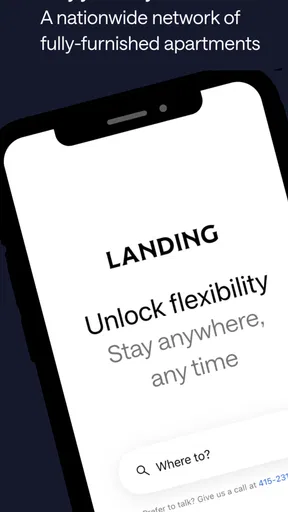
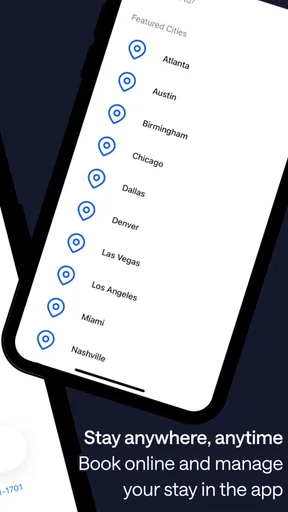
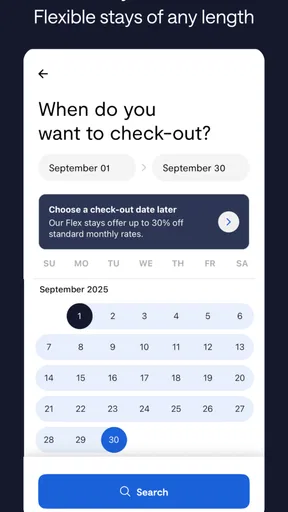
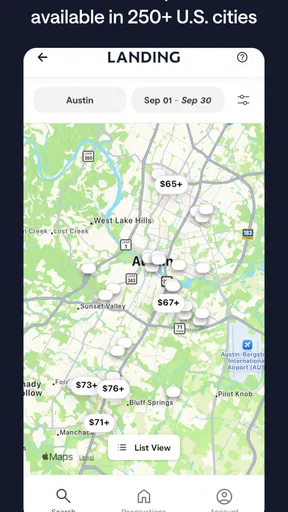
 Analysis by AppCompare
Choosing a furnished apartment from a phone can feel simple until you have to decide whether a place will actually fit your routine. I’d use Landing Furnished Apartments as a starting point when I want a ready-to-live-in home rather than a hotel room, especially for a stay that lasts longer than a quick trip. Its focus is useful, but the important work still happens before booking: checking the location, comparing the details, and making sure the arrangement suits the reason I’m moving.
Start with the details that affect daily life
For a temporary move, “furnished” is only the beginning. I’d first consider how I’ll spend an ordinary weekday: where I need to work, how I’ll get around, and whether I’ll want to cook or spend most of my time out. A listing can look appealing in photos yet be inconvenient if it puts me far from the places I need to reach. I’d shortlist a few options rather than choosing the first attractive apartment, then compare the practical details side by side.
This is where a dedicated furnished-apartment service differs from browsing hotel rooms or general rental listings. Hotels are often easier for short visits, while ordinary rental searches can involve more work to find a place that is furnished and suitable for a temporary stay. Landing is aimed at the middle ground: a home-like setup for people who need more flexibility than a typical long lease. That focus is valuable, but it doesn’t remove the need to confirm that a particular apartment fits my plans.
Where the process can feel less straightforward
The most likely sticking point is not learning the interface; it is deciding whether the available choices match a specific need. Searching by city gives me a useful starting point, but a city can contain very different neighborhoods and travel routines. I’d think through my priorities before searching, such as proximity to work, a quiet place to rest, or access to everyday errands. Being clear about those priorities makes it easier to judge listings without getting distracted by attractive photography.
I’d also treat lease flexibility as something to check for the exact stay I have in mind. The app’s appeal includes options for different lengths of stay, but that does not mean every apartment has the same terms. Before committing, I’d read the listing and booking details carefully, confirm the dates I need, and make sure I understand what is included. That small pause is more useful than assuming that a feature associated with the service applies identically to every home.
Set up a search you can actually use
If the app is showing too many possibilities, I’d avoid browsing without a plan. I’d write down my preferred area, the dates I need, and the few comforts I care about most. Then I’d compare the strongest candidates against those needs instead of repeatedly restarting the search. This is especially helpful when arranging a stay from another city: a tidy shortlist makes it easier to discuss options with a partner, colleague, or family member before booking.
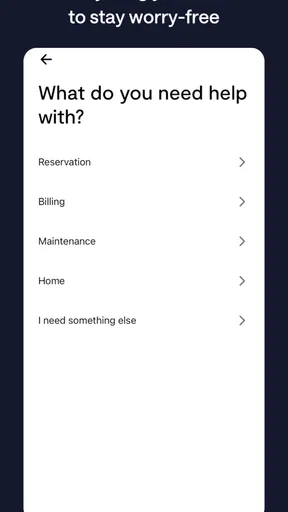
If something seems unclear, I’d check the information attached to that apartment first and use the available customer support if I still need help. For a stay that will become my temporary home, questions about timing, included amenities, or the booking process are worth resolving before I rely on the arrangement. I wouldn’t assume that a general description answers every apartment-specific question.
Worth Reading Before You Choose

EA SPORTS FC Mobile 26 Is a Bigger Football Game, but It Takes Time

Flipboard Shows What News Apps Must Do Beyond the Feed

Switching to Android Auto Means Rethinking Your Driving Routine

Google Calendar Makes a Crowded Week Easier to Manage

Ludo King Makes the Most of the Minutes Between Plans

Baby Panda World Brings Quick Play to Modern Phones, but Its Game Library Feels Busy
Finding Your Perfect Spot
Let’s dive into what makes Landing Furnished Apartments so special. The app is perfect for those who crave a blend of flexibility and comfort. So, whether you’re a digital nomad, a business traveler, or just someone who loves to explore new cities, this app is a game-changer.
The first thing that caught my eye was the ease of navigation. You open the app, and bam! You’re greeted with a clean interface that even your tech-challenged aunt could navigate. The search function is super intuitive; just pop in your desired city, and you’ll get a slew of options, all furnished and ready to roll.
All About the Features
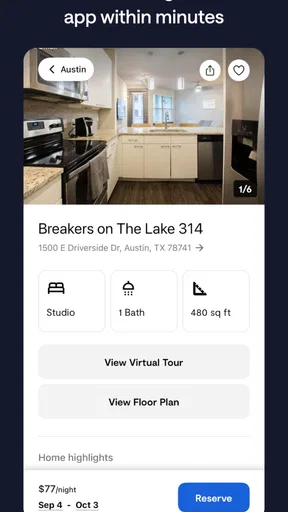
Now, let’s get into the nitty-gritty features. One of the things I absolutely love is the detailed listings. Each apartment comes with high-quality photos—and I’m not talking about those misleading, wide-angle shots. These are legit, showing you exactly what you’ll get.
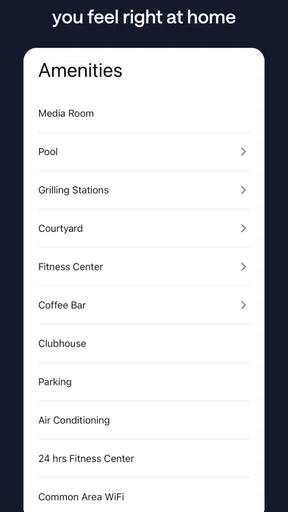
Another cool feature is the flexible lease terms. Whether you’re in town for a month or six, you can find something that suits your stay. No more getting stuck in a year-long lease or awkward negotiations. And the app doesn’t skimp on the amenities either. Think Wi-Fi, utilities, and even some sweet extras like pools or gyms, all included.
Booking Made Simple
Booking your stay is as easy as pie. Seriously, in just a few taps, you can secure your new home. The app’s booking system is smooth and hassle-free, and you can manage everything from your phone. Plus, the customer service is top-notch. If you run into any issues, help is just a chat away.
One thing I found particularly handy is the community feature. Landing isn’t just about finding a place to stay; it’s about becoming part of a community. The app connects you with fellow travelers, offering meetups and events to help you get settled and make new friends. It’s like having a built-in social network, which is a huge plus if you’re new to a city.
The Final Verdict
So, would I recommend Landing Furnished Apartments? Absolutely. It’s perfect for anyone who values flexibility, convenience, and a touch of community. While it might not be the cheapest option out there, you get what you pay for—quality, comfort, and peace of mind.
Next time you’re planning a stay in a new city, skip the hotel hustle and give Landing a try. You might just find your new home away from home, all with a few taps on your phone. Happy travels!
When a move is more than a short trip
I see the strongest use case as a transition: starting a new job before a permanent home is ready, relocating for a project, or testing a city before deciding where to settle. In those situations, a furnished apartment can reduce the number of things I need to arrange at once. I can focus on work and learning the neighborhood rather than coordinating furniture and household basics. It is less compelling for a weekend away, where a hotel may be simpler, or for someone moving permanently who wants to choose and furnish a place from scratch.
Picture arriving for a temporary work assignment with a few days to get oriented. I’d use the app before traveling to compare homes near the likely commute, check the stay dates, and save the best-fit candidates for a second look. Once I arrive, I’d use the first day to test the practical routine—commute, groceries, and whether the apartment works for calls or downtime. That kind of real-life check matters more than choosing solely on décor, because the best temporary home is the one that makes ordinary days easier.
Small checks that prevent avoidable surprises
A useful habit is to separate “must have” from “nice to have” before opening listings. If reliable internet is essential for remote work, I’d confirm how the listing describes it rather than treating a photo of a desk as proof that the apartment suits a workday. If I expect to use a gym or pool, I’d verify that the amenity is relevant to the specific home and stay. This keeps a broad service promise from turning into an assumption about every individual listing.
I’d also make the dates and length of stay the first things I verify, not the last. A promising place is no use if the timing does not line up with a move-in or work schedule. When plans are uncertain, I’d avoid building a travel plan around an option until I have checked the booking details and received any clarification I need. That is a practical safeguard, not a criticism of the app: temporary housing involves details that deserve more attention than a casual overnight booking.
Recovering when a search or booking stalls
If a search does not produce what I expect, I’d make one change at a time. I’d recheck the city and dates, then broaden the area or reconsider a preference that is not essential. Changing several things at once makes it harder to tell what was narrowing the results. If a listing raises a question, I’d keep its details handy and ask support a specific question rather than sending a vague message; a clear query about the dates or an included amenity is more likely to get a useful answer.
If the app behaves unexpectedly, I’d start with ordinary checks: confirm the phone has a working connection, close and reopen the app, and make sure I’m using the current version available to me. Landing is a free House & Home app from Landing - Furnished Apartments, and version 3.0.3 is the current version noted here; it requires iOS 11 or later. Its average rating is 4.7 from 761 ratings, with 157 written reviews, and it has passed 100K installs. Those figures suggest a well-used service, but they cannot tell me whether a particular listing fits my needs, so I’d still judge the apartment on its own details.
Know when the problem is outside the app
Not every delay or mismatch is an interface problem. Availability can depend on the dates and location I’m searching, and a change in travel plans can make an otherwise suitable result unusable. If a booking step is unclear, I’d distinguish between an app issue and a question about the apartment’s terms: the first may call for restarting or checking the connection, while the second is best handled by reviewing the listing and contacting support. Keeping those two kinds of problems separate saves time and avoids repeated searches that cannot answer a policy or property question.
The app is also not a substitute for choosing the right type of accommodation. If I only need a bed for a night or two, a hotel’s straightforward check-in may be more convenient. If I want a long-term home with full control over furnishings and lease arrangements, a conventional rental search may suit me better. Landing makes most sense when I value a furnished setup and a temporary stay enough to accept that I still need to inspect the details and compare the overall fit.
Who I’d recommend it to
I’d recommend it to people who need a ready-to-use place while working, relocating, or spending an extended period in a new city, and who prefer to manage the search from a phone. The broad city coverage makes it worth checking when a move takes me beyond familiar neighborhoods, while the furnished focus narrows the task compared with hunting through general rental listings. The Everyone content rating also makes the app suitable for a broad audience, though the housing decision itself is naturally a grown-up practical one.
I’d be more cautious if my budget is the overriding concern, if I need a very specific property feature, or if I cannot be flexible about neighborhood and timing. In those cases, I’d compare the total value with hotels and regular rental options rather than assuming a furnished apartment is automatically the economical choice. Landing is free to download, but the stay itself is a separate decision; I would assess the apartment’s terms and what is included before deciding whether it represents good value.
A practical verdict for temporary housing
Landing earns a place on my shortlist when the goal is a furnished home for a stay that is too involved for a hotel but does not call for a permanent lease. I like the direct focus on furnished apartments, the ability to search by city, and the presence of customer support and community-oriented elements. The trade-off is that a convenient search cannot remove the need to scrutinize the exact listing, dates, and amenities. I would use it to find and compare candidates, then make the final call only after checking that the apartment supports my real daily routine.
Released on January 9, 2020, Landing has grown into a substantial option in its niche, but my recommendation is still conditional: it is most useful when flexibility and a move-in-ready setup matter more than finding the lowest-cost room or tailoring a long-term home myself. If that describes your situation, it is worth exploring. If not, the better choice may be a hotel for a brief visit or a conventional rental for a more permanent move.
Pros
- User-friendly interface for easy navigation.
- Wide range of apartment options available.
- Detailed descriptions and photos for each listing.
- Flexible booking options for short or long stays.
- Responsive customer support for queries.
Cons
- Limited availability in smaller cities.
- Occasional app crashes during searches.
- Some listings have outdated information.
- No option for direct communication with owners.
- High service fees on certain bookings.
FAQs for Landing Furnished Apartments
What features does the Landing Furnished Apartments app offer?
The Landing Furnished Apartments app provides a seamless experience for finding and booking fully furnished apartments. Users can explore a wide range of properties, view detailed photos, and read comprehensive descriptions. The app also offers virtual tours, flexible lease options, and an easy-to-use booking system, making it convenient for travelers seeking short-term or long-term stays.
How does the booking process work on the app?
Booking through the Landing Furnished Apartments app is straightforward. Users can browse available apartments, select their preferred dates, and complete the booking directly within the app. Payment is secure, and users receive instant confirmation. The app also allows users to manage their bookings, view past reservations, and contact customer support if needed.
Are there any additional fees or charges when using the app?
While the app itself is free to download, users should be aware of potential additional fees. These may include cleaning fees, security deposits, or service charges, which vary depending on the property. The app clearly outlines all associated costs before finalizing a booking, ensuring transparency and helping users budget effectively.
Is customer support available through the app?
Yes, the Landing Furnished Apartments app offers robust customer support. Users can access support directly through the app, with options for live chat, email, or phone assistance. The support team is available to answer questions, resolve issues, or provide additional information about properties, ensuring a smooth user experience.
What types of apartments are available through the app?
The app offers a diverse selection of furnished apartments catering to various needs and preferences. Options range from cozy studios to spacious multi-bedroom apartments, suitable for individuals, families, or business travelers. Each listing provides detailed information about amenities, location, and nearby attractions, helping users make informed decisions.


